
Best SEO Tools to Improve Your Search Rankings in 2026
Search for SEO tools today and you’ll quickly run into a familiar problem: there are too many of them.
One platform promises better keyword research. Another boasts the biggest backlink database. Then there’s a technical SEO crawler, a content optimization tool, a rank tracker, and a handful of AI-powered platforms telling you they can make SEO easier.
Sounds helpful, right? Until you’re sitting there with twelve tabs open wondering which one you should actually use.
That’s the real challenge in 2026. Finding an SEO tool isn’t difficult. Finding the right one for your website, skill level, and budget is.
So instead of throwing a giant list of software at you, let’s look at the tools that are genuinely useful, what they’re good at, who should use them, and when you probably don’t need to pay for them.
What Are SEO Tools, and Why Do They Matter?
SEO tools are software platforms that help website owners and marketers research, monitor, audit, and improve their visibility in search engines.
Think of an SEO tool as equipment in a toolbox. You wouldn’t use a measuring tape to tighten a screw, and SEO works much the same way. Keyword research, technical SEO, backlink analysis, content optimization, and rank tracking are different jobs, so different tools are designed to handle them.
For example, keyword research tools can show what people search for and help identify potential topics. Technical SEO tools can uncover broken links, crawl problems, duplicate pages, or indexing issues. Backlink platforms can help you understand which websites link to your competitors.
Some platforms combine several of these functions into one dashboard, which is handy when you’re managing a growing website.
But there’s an important distinction: SEO tools provide information; they don’t create an SEO strategy for you.
A tool might tell you that a keyword has thousands of searches every month. It can’t automatically tell you whether your website has a realistic chance of ranking for it or whether that keyword actually matches what your audience wants.
What Makes an SEO Tool Worth Using in 2026?
The best SEO software isn’t necessarily the one with the longest feature list. A useful tool should turn complicated SEO data into information you can actually act on.
When I compare SEO tools, I pay attention to a few things beyond flashy dashboards and endless feature pages.
| Factor | Why It Matters |
| Data quality | Bad data can lead to bad decisions. |
| Ease of use | Beginners shouldn’t need hours of training. |
| Keyword research | Helps uncover realistic search opportunities |
| Competitor data | Shows where competitors are gaining visibility |
| Technical auditing | Finds crawling, indexing, and structural issues |
| Backlink data | Helps evaluate links and referring domains |
| Rank tracking | Shows whether SEO efforts are moving |
| Content features | Helps identify topics and optimization opportunities |
| Reporting | Important for freelancers, agencies, and teams |
| Pricing | The tool should match your actual needs and budget. |
AI features are another factor worth considering in 2026, but don’t get distracted by the word “AI.” An AI feature isn’t automatically useful just because it exists.
If it saves you time, improves analysis, or helps you discover something you would otherwise miss, great. If it simply generates another generic paragraph about “optimizing your content,” you probably didn’t need it in the first place.
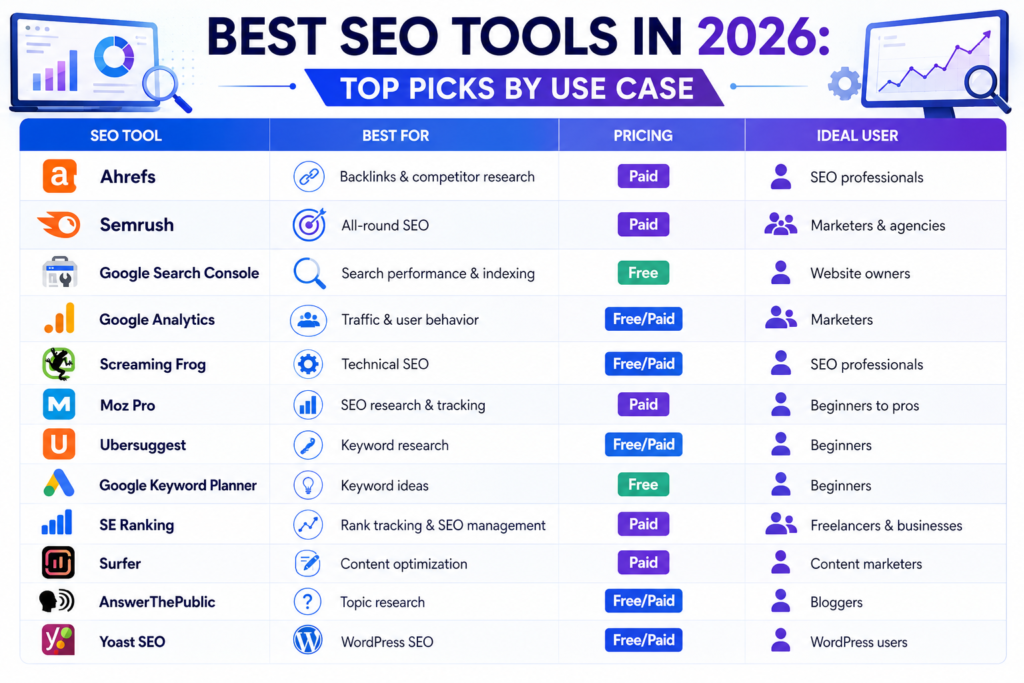
Best SEO Tools in 2026: Top Picks by Use Case
The best SEO tools depend on what you’re trying to accomplish. A blogger doing keyword research doesn’t need the same setup as an SEO agency managing dozens of client websites.
Here’s a quick comparison before we get into the individual tools:
| SEO Tool | Best For | Pricing | Ideal User |
| Ahrefs | Backlinks & competitor research | Paid | SEO professionals |
| Semrush | All-round SEO | Paid | Marketers & agencies |
| Google Search Console | Search performance & indexing | Free | Website owners |
| Google Analytics | Traffic & user behavior | Free/Paid | Marketers |
| Screaming Frog | Technical SEO | Free/Paid | SEO professionals |
| Moz Pro | SEO research & tracking | Paid | Beginners to pros |
| Ubersuggest | Keyword research | Free/Paid | Beginners |
| Google Keyword Planner | Keyword ideas | Free | Beginners |
| SE Ranking | Rank tracking & SEO management | Paid | Freelancers & businesses |
| Surfer | Content optimization | Paid | Content marketers |
| AnswerThePublic | Topic research | Free/Paid | Bloggers |
| Yoast SEO | WordPress SEO | Free/Paid | WordPress users |
Ahrefs
Ahrefs is particularly strong for backlink analysis, competitor research, keyword research, and discovering which pages are attracting organic visibility.
Its depth is one of its biggest advantages. You can dig into competitor keywords, referring domains, backlinks, content gaps, and ranking opportunities.
The downside? Beginners can easily feel overwhelmed. There’s a lot of data, and having more data doesn’t automatically mean knowing what to do with it.
Best for: SEO professionals, agencies, and serious website owners.
Semrush
Semrush is one of the more comprehensive SEO platforms available. It combines keyword research, competitor analysis, site audits, rank tracking, backlink data, content-related tools, and other marketing features.
It’s a strong option if you want several SEO workflows under one roof rather than switching between multiple platforms.
The catch is that smaller websites may not need all that power immediately.
Best for: Marketers, freelancers, agencies, and growing businesses.
Google Search Console
Google Search Console is one of the first tools I’d recommend to almost every website owner.
It provides information about search queries, impressions, clicks, indexing, page performance, and certain technical issues. More importantly, it gives you data directly connected to your website’s presence in Google Search.
And yes, it’s free.
For someone learning SEO, that’s a pretty good place to start.
Best for: Every website owner, especially beginners.
Google Analytics
Google Analytics helps you understand what happens after visitors reach your website.
You can analyze traffic sources, user behavior, engagement, conversions, and other website interactions. While it isn’t a traditional keyword research platform, it complements Search Console nicely.
After all, getting someone to your website is only part of the job. You also need to understand what happens once they arrive.
Best for: Website owners, marketers, and businesses.
Screaming Frog SEO Spider
Screaming Frog is built for technical SEO crawling. It can help identify broken links, redirect issues, missing metadata, duplicate elements, and other website problems.
It isn’t the prettiest tool in the SEO world, but that’s not really its job.
Its job is to crawl your website and find things you might have missed.
Best for: Technical SEO audits and advanced website analysis.
Moz Pro
Moz Pro provides keyword research, rank tracking, site auditing, and backlink-related features.
Its interface can be approachable for people who are learning SEO but still want more advanced capabilities than basic free platforms.
Best for: Beginners moving toward professional SEO workflows.
Ubersuggest
Ubersuggest focuses on accessible keyword research, competitor analysis, content ideas, and backlink insights.
For someone learning SEO or managing a small blog, it can be easier to understand than some of the larger enterprise-style platforms.
Best for: Beginners, bloggers, and small websites.
Google Keyword Planner
Google Keyword Planner was created primarily for Google Ads, but it can still be useful for finding keyword ideas and understanding search demand.
It shouldn’t be treated as a complete SEO platform. Think of it as one useful piece of the keyword research puzzle.
Best for: Beginners and advertisers.
SE Ranking
SE Ranking combines keyword rank tracking, competitor research, website auditing, and backlink-related features.
It’s worth considering if you want an all-round SEO platform for a business or freelance workflow.
Best for: Freelancers, small businesses, and growing websites.
Surfer
Surfer focuses heavily on content optimization. It can help writers analyze search results and identify terms and topics that may be relevant to a page.
One warning, though: don’t treat a content score like a school grade. A page can score highly and still be boring, poorly structured, or completely miss the searcher’s intent.
Best for: Content writers and SEO-focused marketers.
AnswerThePublic
AnswerThePublic helps uncover questions and related searches around a topic.
It’s particularly useful during content planning. You know that moment when you’ve picked a keyword but have absolutely no idea what to write next? That’s where a tool like this can help.
Best for: Bloggers, content writers, and topic research.
Yoast SEO
Yoast SEO is widely used by WordPress websites for on-page SEO guidance.
It can help with metadata, readability, XML sitemaps, and other basic optimization tasks.
It’s useful for on-page SEO, but it isn’t a replacement for a complete keyword research or backlink analysis platform.
Best for: WordPress website owners.
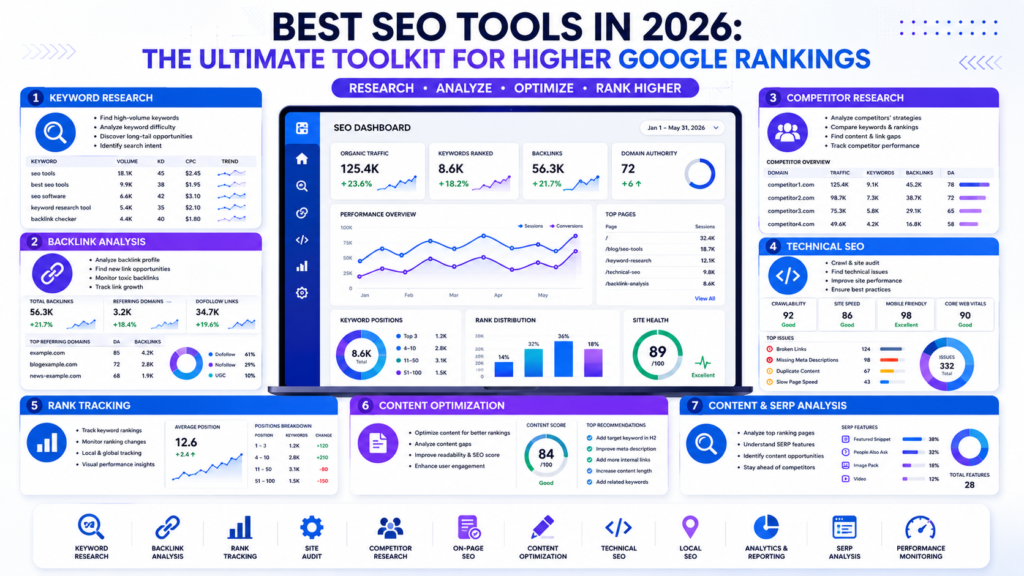
Which SEO Tools Are Best for Keyword Research?
The best keyword research tools help you evaluate search demand, competition, search intent, keyword difficulty, and related opportunities rather than simply showing search volume.
| Tool | Main Strength | Beginner Friendly | Best Use |
| Google Keyword Planner | Keyword ideas & search demand | Yes. | Basic research |
| Ahrefs | Keyword & SERP analysis | Moderate | Advanced research |
| Semrush | Keyword & competitor gaps | Moderate | Comprehensive research |
| Ubersuggest | Keyword suggestions | Yes. | Beginner research |
| AnswerThePublic | Questions & topic ideas | Yes. | Content planning |
One mistake I see beginners make repeatedly is choosing keywords because they have impressive search volume.
That’s backwards.
A keyword with 50,000 searches isn’t necessarily better than one with 500 searches. If the larger keyword is extremely competitive and the smaller keyword perfectly matches your audience, the smaller opportunity may be much more valuable.
Look at search intent, keyword difficulty, competition, long-tail variations, SERP features, and commercial intent before deciding what to target.
The goal isn’t to collect the biggest numbers. It’s to find keywords your website can realistically compete for.
Which SEO Tools Should You Use for Technical SEO?
Technical SEO tools help identify website problems that can interfere with crawling, indexing, structure, and search performance.
| Technical SEO Problem | Useful Tool |
| Indexing issues | Google Search Console |
| Broken links | Screaming Frog |
| Redirect problems | Screaming Frog |
| Sitemap issues | Google Search Console |
| Duplicate pages | Screaming Frog |
| Canonical problems | Screaming Frog |
| Crawl issues | Search Console + Screaming Frog |
| Page performance | Search Console + PageSpeed Insights |
Google Search Console is a sensible starting point because it provides information about how Google sees your website.
Screaming Frog becomes especially useful when you want to crawl the site yourself and investigate technical problems in greater depth.
When I audit a website, I don’t start by obsessing over tiny title-tag changes. First, I want to know whether important pages can actually be crawled and indexed.
Fixing a serious technical problem is usually more valuable than spending an hour debating whether a title needs one extra word.
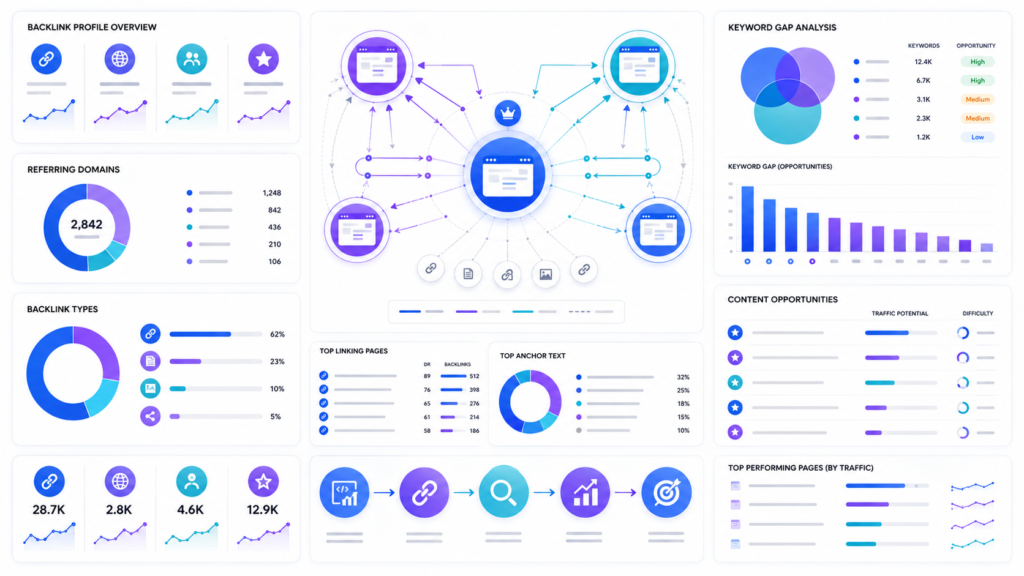
Best SEO Tools for Competitor and Backlink Analysis
SEO competitor analysis tools and backlink analysis tools help you understand how competing websites are gaining visibility and which sites are linking to them.
| Tool | Competitor Research | Backlink Analysis | Content Gaps |
| Ahrefs | Excellent | Excellent | Strong |
| Semrush | Excellent | Strong | Strong |
| Moz Pro | Strong | Strong | Moderate |
| Ubersuggest | Moderate | Moderate | Moderate |
Ahrefs and Semrush are particularly useful for analyzing competitor keywords, backlink profiles, referring domains, top-performing pages, content gaps, and keyword gaps.
But don’t use competitor research as an excuse to copy.
If a competitor ranks for a topic, don’t simply rewrite their article with different wording. Look at why their page works.
Maybe it answers the searcher’s question more completely. Maybe its internal linking is better. Maybe it covers a topic competitors have ignored.
That’s the useful part of competitor analysis: finding opportunities, not creating clones.
Free vs. Paid SEO Tools: Which One Should You Choose?
Free SEO tools can be more than enough for beginners and small websites, while paid platforms become more valuable when you need deeper datasets, advanced research, or professional reporting.
| User | Good Starting Tools | Paid Tool Needed? |
| Student | Search Console + Keyword Planner | No |
| Beginner Blogger | Search Console + Analytics + Ubersuggest | Usually no |
| Small Business | Search Console + Analytics + SEO platform | Depends |
| Freelancer | Semrush/Ahrefs/SE Ranking | Often useful |
| SEO Agency | Full SEO platform + specialist tools | Usually |
| Large Website | Multiple SEO platforms | Often |
The best free SEO tools include Google Search Console, Google Analytics, Google Keyword Planner, and Bing Webmaster Tools.
If you’re building your first website, there’s no reason to spend a large amount of money just to feel like you’re doing “serious SEO.”
Start free. Learn the fundamentals. Then pay for software when you can clearly explain what problem the paid tool will solve.
That’s a much better investment than buying an expensive subscription and checking it twice a month.
How to Choose the Right SEO Tool for Your Website?
The right SEO tool depends on your website, goals, experience, workload, and budget—not on which platform is most popular.
For students and beginners, start with Google Search Console, Google Analytics, and a basic keyword research tool.
For bloggers, focus on keyword research, search intent, content planning, and rank tracking.
For small businesses, competitor research, technical audits, local SEO, and keyword tracking may be more important.
For freelancers and agencies, platforms such as Ahrefs, Semrush, or SE Ranking can become useful because saving time across multiple projects adds up quickly.
For advanced SEO professionals, using several specialized platforms can make sense because no single tool has perfect data for every SEO task.
My rule is simple: start with the problem, then choose the tool.
Don’t buy a tool first and invent a reason to use it afterward.
Choose Fewer Tools and Use Them Better
The biggest SEO mistake isn’t necessarily choosing the wrong platform. It’s collecting ten different tools and barely learning how any of them work.
The best SEO tools can show you keywords, backlinks, technical errors, competitor insights, and ranking trends. But they can’t decide what your audience actually needs. They can’t replace good content, clear search intent, smart internal linking, or human judgment.
If you’re starting out, choose one keyword research tool, connect Google Search Console and Analytics, and spend some time understanding the data before adding more software.
You don’t need the most expensive dashboard in the room. You need the information that helps you make the next smart decision.
So pick one tool that fits your current goal and start using it. Your website will teach you more than another twenty browser tabs ever will.
FAQ
What are the best SEO tools in 2026?
The best SEO tools in 2026 include Ahrefs, Semrush, Google Search Console, Screaming Frog, Moz Pro, and Google Keyword Planner, depending on the task.
There isn’t one universal winner. Keyword research, technical SEO, backlink analysis, and performance monitoring require different capabilities.
Which SEO tools are best for beginners?
The best SEO tools for beginners are affordable, easy to understand, and useful for learning how SEO data connects to website performance.
Google Search Console and Google Analytics are excellent starting points, while Ubersuggest and Google Keyword Planner can help beginners learn keyword research.
Are free SEO tools enough for a new website?
Yes, free SEO tools are often enough for a new website when you’re learning SEO and managing a relatively small site.
You can research keywords, monitor indexing, analyze search performance, and understand website traffic without immediately paying for an expensive platform.
Which SEO tool is best for keyword research?
Ahrefs, Semrush, Google Keyword Planner, and Ubersuggest are useful keyword research tools, but the best choice depends on your budget and the depth of analysis you need.
Search volume shouldn’t be your only deciding factor. Search intent, competition, keyword difficulty, and relevance to your audience matter just as much.
How do SEO tools help improve Google rankings?
SEO tools help identify keyword opportunities, technical issues, content gaps, backlinks, and ranking trends so you can make better SEO decisions.
Can I use multiple SEO tools for the same website?
Yes. Different tools provide different data, so you can combine tools like Google Search Console, Screaming Frog, Ahrefs, or Semrush for specific SEO tasks.
How often should I use SEO tools?
It depends on the task. Check rankings and performance regularly, while technical audits can be done after major website changes or at scheduled intervals.
About the Author
Roshni – Content Writer, Digital Marketer, SEO Specialist, Social Media Marketer
Content writer and digital marketing strategist with more than three years of experience, passionate about delivering informative and understandable pieces on various topics like Digital Marketing, SEO, artificial intelligence, and online business growth with factual research and evidence to her readers.